Comcast Xfinity’s residential internet service sets a new standard with all-in plans, superior WiFi, and low-lag connection for work and play.
For 5 years
$45/mo*
$60/mo*
$70/mo*
*For 60 mos., no term contract. Taxes and equipment not included. Incl. up to $10/mo. auto-pay & paperless bill discount. See Broadband Facts: https://www.xfinity.com/broadband-labels
The 2010 Winter Olympics were edgy, carrying first wins for many nations, but "Xfinity" was a far edgier rebranding by Comcast to rewrite some of the negative sentiment it had previously accumulated. Today, Xfinity home internet is available across 41 states, with better infrastructure coverage in DC, MD, and MA, and a larger customer base in TX, FL, CA, and IL.
Our experts scouted newly connected households across Central Indiana rural communities and found Xfinity serving 99.9% reliable speeds over its upgraded fiber-powered network. This seems like a point of relief for many residents seeking dependable internet access beyond the wireless.
Read More
Fiber-backed lines enable Xfinity to deliver full-throttle speeds up to 1.2 Gig (2 Gbps in some areas), while the entry-level tier at 300 Mbps remains highly competitive. It easily exceeds the FCC's 100 Mbps broadband threshold and rivals other cable giants. The significance? A 300 Mbps baseline is scalable, offering expansive bandwidth to support rising household data needs and letting you download a 4K movie in about 6 minutes (as noted on xfinity.com).
Minutes turn to seconds as you go up the plan ladder.
Xfinity's move toward a simple, standardized national plan structure is a breath of fresh air for customers who previously had to deal with the provider's sporadic regional pricing. Shifting houses used to mean adjusting to different Xfinity Internet promotions across the Central, Western, and Northeastern regions (where AZ, CO, and WA residents often enjoyed much cheaper rates).
Now, there are nationally consistent Xfinity Internet tiers featuring a 5-Year Price Guarantee, leading to over $2000 in projected savings over 60 months. (see Xfinity Internet Prices & Savings Breakdown for more details)
The newly launched plan names are pretty straightforward, mirroring actual speeds transmitted. This is a welcome venture beyond the long-standing creativity of “Xfinity Performance Internet" that feels outdated in a market focused on clarity and transparency.
Our experts found what Steve Croney, COO of Comcast, called the "new standard WiFi" quite innovative. Pairing DOCSIS 4.0 technology with the latest WiFi 7 (802.11be) standard, the new XB10 gateway offers multi-gig speed support and is included with higher-tier plans.
For users with advanced data needs like remote work or cloud computing, it instantly means faster speeds, better coverage, greater device integration, and enhanced security. It might be overkill for basic-usage customers, who can still receive moderately capable, previous-gen gateway models with their starter plans.
Xfinity WiFi deals don't stop at the hardware. Value expands with the ‘unlimited data’ option, included with the new rolled-out plans (though existing customers may still have a monthly 1.2TB cap). We don't think it's truly unlimited on the scale of what fiber providers offer; bandwidth availability can fluctuate with peak hours, as is the case with most last-mile shared cable connections.
We also evaluated the Mobile Select line included for a year feature. While this isn't something we traditionally expect from a cable provider, it is happening more frequently market-wide. This strategic shift seems to be an aggressive effort to keep cable customers from migrating entirely to 5G wireless.
"Watch your savings stack up," it says on xfinity.com.
Taking a cost angle, a major pain point for low-income users, the provider shows how an Internet + Mobile bundle can save customers $30 to $60 more per month than standalone cellular plans from AT&T, Verizon, or T-Mobile.
Xfinity Internet specials deliver the knockout blow by baking streaming apps directly into select Gigabit plans. This bundled entertainment across multiple screens is fantastic for tech-forward homes, though not quite as valuable for seniors or budget-first users who prefer raw internet without the overwhelm.
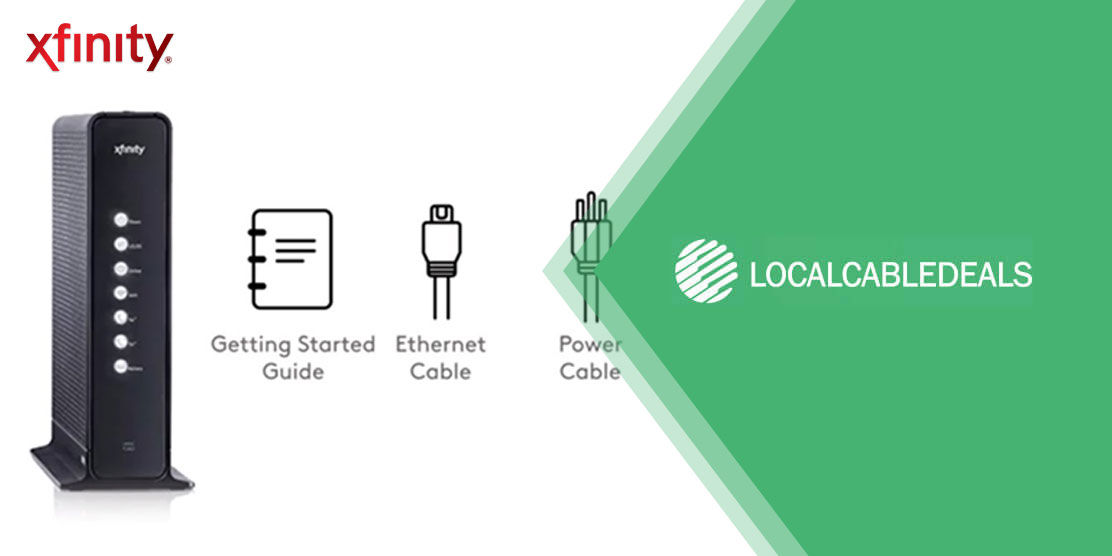
For installation, we liked the convenience of a self-install Getting Started kit, shipped to a customer’s address within 3 to 5 business days for $0, and activation of the network through the Xfinity app. The professional installation for a flat $100 fee is fairly reasonable in the industry-wide range of $85 to $200.
Xfinity customer service also appears to be well-received and has even seen a 3% growth on the American Customer Satisfaction Index compared to 2024.
Sources
https://corporate.comcast.com/stories/local/indiana/xfinity-and-comcast-business-high-speed-internet-available-to-more-than-2100-previously-unserved-central-indianaEnter your ZIP code below to check if Xfinity Internet is available in your area.
Xfinity's standard everyday low price gets you 300 Mbps for $80/mo, which is surely not the cheapest rate you can find in the market for this speed.
This is where the 5-Year Price Guarantee stands out. It helps you lock in a discounted Xfinity Internet price for a set duration and allows you to save approximately $2,100 to $2,400 over your term, depending on the plan you choose. $2,000 in savings roughly means you get more than two years of your service costs covered.
While that's an attractive dollar value, a 60-month commitment may not be ideal if you move around much. You may be protected from price hikes, but you may also miss a price drop. Still, our experts like the stability Xfinity's price guarantee offers, along with the lucrative discounts.
Here's a breakdown of Xfinity's new everyday price plans vs. locked-in savings to help you compare.
| Plan | 5-Year Guarantee Price | Everyday Low Price | Monthly Savings | 60-Month Savings |
|---|---|---|---|---|
| 300 Mbps | $45/mo* | $80/mo | $35/mo | ~$2,100 |
| 500 Mbps | $60/mo* | $95/mo | $35/mo | ~$2,100 |
| 1 Gig | $70/mo* | $110/mo | $40/mo | ~$2,400 |
| 2 Gig (1.2 Gig) | $100/mo* | $140/mo | $40/mo | ~$2,400 |
*With Autopay and Paperless Discount.
Included in the plan price are the following perks, which add up to over $55 in monthly value for new Xfinity customers:
Our experts put the most popular Xfinity high-speed internet plans under the microscope to help you choose the right one for your needs. Here are our findings and buying recommendations:
We ran two parallel Zoom calls, while downloading Fortnite’s latest v40.20 Update/Showdown Act II update on the 300 Mbps connection.
The video calls remained stable with no interruptions, while the game update took 22 minutes to complete.
We believe this plan is ideal for anyone who doesn’t mind taking a short nap during large downloads.
We played three simultaneous 4K streams on different streaming apps across separate TVs, while syncing a 25 GB backup to the cloud.
Our screens didn’t freeze mid-streaming, though one faced minor buffering during runtime. The backup completed in about 7 minutes.
We believe this plan is a good fit for mid-sized households with 5-6 personal devices connected at the same time.
We rapidly issued commands to two voice assistants, smart light switches, a smart thermostat, and a smart refrigerator, while streaming live monitoring footage in 1080p from four outdoor security cameras.
The 1 Gig plan had so much downstream room that all our data requests were handled instantly, without noticeable lag.
We believe this plan matches the needs of tech-savvy users managing smart home ecosystems.
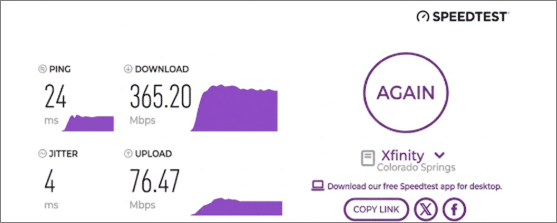
To evaluate Xfinity’s real-world performance, our tech expert, Novelty Meza from Colorado Springs, CO, conducted an Xfinity speed check in peak evening hours using our internet speed test tool.
Verified Speed Test Result
Novelty’s speed test gave mixed results. Download speeds were above-advertised, showing the network’s strength and capability of handling high bandwidth needs. The upload speed and ping, on the other hand, fell slightly short of what the company disclosed* - a common limitation among major cable internet providers.
*See Broadband Facts: https://www.xfinity.com/broadband-labels Test Xfinity Speed in Your AreaTake control with Xfinity’s Getting Started kit and get online in a few minutes. There’s no need to wait for a technician, pay for professional setup fees, or drill holes in your walls.
To see if setting up Xfinity Internet is as easy as it sounds, our team ordered a standard ‘Getting Started Kit’ and timed the entire process in a home setting.

The entire setup process took us about 20 minutes.
We recommend the self-install option for users who know their way around cables. For older adults or anyone who prefers expert assistance, professional installation would be more convenient.
For just $15/mo.
Add NowFor just $30/mo.
Order NowFor just $18/mo.
Stream NowXfinity covers Washington, D.C., and 41 states, including California, Texas, Florida, and more. Enter your ZIP code below to check if Xfinity services are available in your area.
Xfinity home internet offers download speeds up to 2 Gig. However, the maximum speed you’ll get depends on your service plan and location.
While you might get unlimited data included with your plan in some areas, if not, you can add it for an additional $30/mo.
The 300 Mbps plan from Xfinity is the most affordable option, priced at $45/mo. for 5 years.
With Autopay and Paperless Discount
*For 60 mos., no term contract. Taxes and equipment not included. Incl. up to $10/mo. auto-pay & paperless bill discount. See Broadband Facts:
https://www.xfinity.com/broadband-labels
Once the 5-year guarantee period ends, your bill will revert to the then-current standard rates, depending on your chosen plan and your location.
Catch the latest from our Blog. Find high-speed options for internet, TV, or bundles that meet your needs.
Browse our blog archivePlease let us know how we helped you.
Was this page helpful?
Please let us know how we can improve.
Your insight helps, and we’ll do our best to improve your experience.

 (844) 572-2220
 Pricing
 Performance
 Value-Added Features
 Customer Satisfaction