(855) 771-3154

You must have noticed that even after you upgrade your internet to a faster speed, it might feel slower than expected. That’s because we are used to using download speeds as our metric for measuring the speed of our internet. But the real picture may be a little different.
This blog aims to redirect your focus from speed to latency as the metric to measure the efficiency of your internet. Download speed, measured in megabits per second (Mbps), is the capacity, and latency – measured in milliseconds (ms)- is the real force behind internet speed.
Sounds a bit complex, right? Don’t worry. Read on to understand in simpler terms!
This blog explores:
- What is internet speed?
- What is latency?
- What is the difference between speed and latency?
- Common causes of high latency
- Average latency for each internet connection type
- How to test your internet latency?
- How to reduce latency and improve your internet performance?
What is Internet Speed?
Internet speed is measured in megabits per second (Mbps) and refers to the amount of data that can be transferred over the internet in a second. This means that while a certain amount of data is guaranteed to be received in a second, whether or not it can be is a different story. To ensure that this set amount of data is sent within the span of a ‘second’, you need low latency.
Let’s understand what latency really is:
What is Internet Latency?
Internet latency, also known as ping rate, measured in milliseconds, is the real measure of the time it will take for a packet of data to travel from one point to another over the internet. This is why latency comes closer to measuring the real speed of your online actions. If you have a higher latency, it will take longer for your data to travel to and from across the internet. But having a lower latency means the action you take on the internet is reflected on the screen within milliseconds.
What is the Difference Between Speed and Latency?
As discussed above, speed is the capacity of your internet while latency is the time it takes for data to transfer between two points. Having faster speed will ensure that a large amount of data can be transferred efficiently, while having low latency will make sure that your online actions are sent and received quickly.
Here are some activities for which having a faster download speed is more important:
- Downloading large files
- Streaming 4K movies
- Updating software or apps
On the other hand, you need lower latency for tasks like:
- Video calls
- Online gaming
- Voice chats
These activities reflect how online activities that depend more on downloading need faster speeds, whereas activities that need quicker response need lower latency.
Common Causes of High Latency
If you check your internet speed and don’t see any fluctuations but online activities still have lag, you probably have high latency. Here are some common causes of high internet latency:
- Longer distance from the provider’s server – if your ISP’s server is located far away from your home, it takes longer for data to travel back and forth, causing higher latency.
How to fix this? Look for an internet provider located closer to you. - Network congestion or heavy traffic – you may experience slower speeds during peak hours when everyone is using the internet, causing network congestion and leading to slower response rates.
How to fix this? Prioritize intensive internet activity during non-peak hours. - WiFi interference – internet signals travel through radio waves which, when interfered with, cause devices to resend data, causing higher latency
How to fix this? Restart your router to refresh the signal path. - Outdated router or WiFi gateway – older WiFi equipment may not be able to handle faster speeds or process data at faster rates, leading to higher latency
How to fix this? Upgrade your router so it's compatible with your internet speed.
Average Latency for Each Internet Connection Type
Each internet connection type has a different latency, depending on the technology used. Here are average latencies of the most common internet connection types:
| Internet Connection Type | Average Latency (ms) |
|---|---|
| Fiber Internet | 5 – 20 ms |
| Cable Internet | 20 – 50 ms |
| DSL Internet | 50 – 100 ms |
| 5G Home Internet | 10 – 100 ms |
| Satellite Internet | 500+ ms |
How to Test Your Internet Latency?
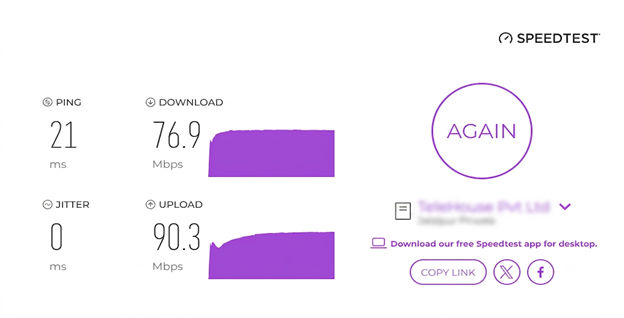
You can test your internet latency the same way you check internet speed. Simply go to any online speed test page, click ‘GO’ on the test, and the tool will take a few seconds to process and get the average upload and download speed for you.
In the same test, you will see a measure of ‘ping rate’. That is your latency. The ping rate will be displayed in milliseconds (ms). From there, you will get an idea of how much latency your connection has.
How to Reduce Latency and Improve Your Internet Performance?
Here are some tips to reduce your internet latency and improve network performance:
- Use an Ethernet cable for a direct connection and reduced ping rate
- Restart your router to get a fresh path for your signals to travel across
- Place your WiFi in a central position within your home for better connectivity
- Switch to the 5 GHz WiFi band to avoid network congestion
- Shut down extra apps or background downloads
If all these don’t help and your latency remains an issue, you can explore other internet options in your area that are working well for your neighbors. You can get on a free consultation call with our live agents to find the perfect ISP match for your home based on your family’s needs.