(855) 771-3154

altafiber offers symmetrical internet speeds up to 3 Gbps with no data caps. To ensure consistent performance, the provider relies on advanced routers and modems, exclusively designed for fiber connectivity. So, what equipment does altafiber use, and how can you set it up on your own? This guide covers everything in detail. So, let’s get started:
What Equipment does altafiber Use?
Since altafiber provides fiber internet, it uses an ONT (Optical Network Terminal) to connect you to a fiber-based network. To deliver reliable whole-home coverage, altafiber pairs the ONT with eero wireless gateways, creating a mesh WiFi system for uninterrupted connectivity.
The most commonly used eero devices by altafiber include:
- eero Pro 6E
- eero Pro 7
- eero Max 7
- Google wireless gateways
Benefits of eero Gateways
altafiber relies on eero gateways because of their significant benefits that are tailored specifically for fiber internet solutions.
Security Guaranteed
With eero gateways, your altafiber internet remains secure. The added eero Secure protective suite provides additional network security, including active threat protection, advanced parental controls, etc. It also provides an in-depth insight into data consumption and network usage.
A New Level of Internet Speed
altafiber’s eero Pro 7 delivers powerful, high-speed internet connectivity designed to support today’s bandwidth-heavy households. This wireless gateway upholds speeds up to 4.3 Gbps, allowing users to fully experience symmetrical speed performance.
Beyond speeds, the eero Pro 7 has built-in advanced security protocols and encryption, which, combined with eero Secure, offer an additional layer of internet security. The gateway also provides coverage up to 2,500 sq. ft., supporting more than 200 devices, making it ideal for large homes.
WiFi Built for All
The eero Pro 6E wireless gateway offered by altafiber provides a dedicated 6 GHz traffic lane for keeping your devices connected seamlessly without disruptions. It also adds the same level of security for all connected devices, enabling superfast performance with high-end protection.
What is an ONT and How Does it Work?
An Optical Network Terminal, or ONT, is an endpoint device used to connect fiber internet users to the network. Using the Fiber-to-the-Premises (FTTP)/Fiber-to-the-Home (FTTH) technology, it connects the users with the provider’s fiber network, delivering fast internet speeds.
How does the ONT work?
The ONT uses light signals, converts them into a transferable medium, and sends/receives the data on a fiber optics cable. Here’s a breakdown of how it works:
- Using an optical interface, the ONT converts data into light signals, removing any errors, and prepares for transmission via the cable.
- The transmission is done using the Ethernet ports connecting your devices to the fiber network.
- The ONT sends and receives transmissions in the form of optical signals, allowing two-way communication.
What You Need to Know About altafiber Routers?
Let’s explore the specifications for the routers offered by altafiber Internet below:
eero Pro 7
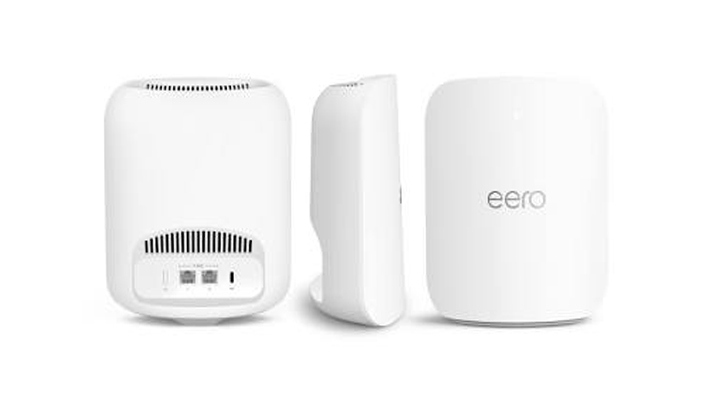
The eero Pro 7 is one of the benchmark wireless gateways offered by altafiber. It’s an excellent WiFi mesh system with tri-band technology offering outstanding speeds and network performance. It comes with added features that are designed to provide rapid network access, optimized usage, and effectively manage traffic for maximum output. In addition, it comes with these added features:
- MU-MIMO Supported
- QoS Supported
- Built-in parental controls and anti-malware tools
- IPv6 compatible
- Up to 2.8 Gbps speeds (close proximity)
- Up to 6,000 sq ft. coverage (hardware tested)
Combined with altafiber’s Fioptics, the eero Pro 7 delivers exceptional wireless internet connectivity to every corner of your house.
eero Max 7
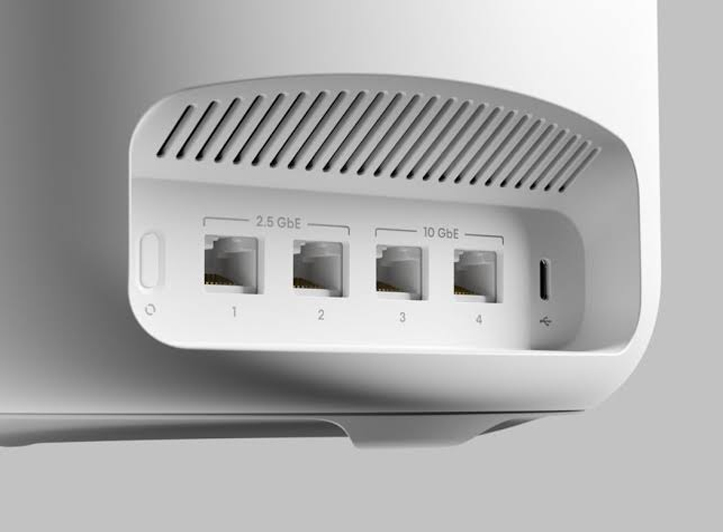
The eero Max 7 is a powerhouse mesh WiFi system built for offering strong signal coverage with additional features for network optimization. With tri-band technology, it optimizes for the best network performance, ensuring seamless connectivity and speeds. In addition, it packs the following features:
- MU-MIMO supported
- Built-in wireless parental controls and anti-malware tools
- Up to 5000 sq ft. coverage
- Beamforming supported
- Guest networking options available
- Wired backhauling supported
- Up to 2.1 Gbps speeds (close proximity)
Paired with altafiber, the eero Max 7 provides a strong network foundation, empowering your internet with speed, consistency, and durability.
eero Pro 6E
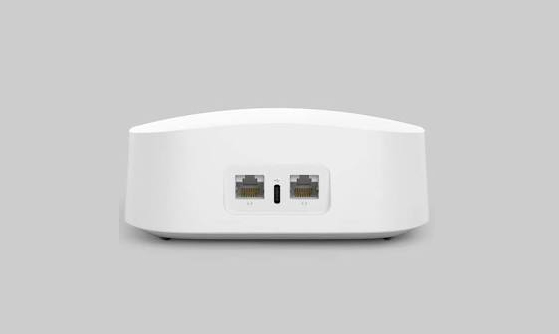
With altafiber Internet, you can also get eero Pro 6E, a powerful multi-gig WAN-supported device, perfect for mesh network performance. Not only does it offer an amazing throughput speed, but it’s also one of the ideal devices for connecting your smart home devices. It packs the following features:
- MU-MIMO compatible
- IPv6 supported
- Built-in parental and anti-malware controls
- Link aggregation and beamforming supported
- Guest networking supported
- Up to 925 Mbps speeds (close proximity)
- Up to 6000 sq ft coverage
Although it’s not as strong as the eero Pro 7 or Max 7, the eero Pro 6E is an amazing WiFi mesh gateway that blends perfectly with altafiber’s internet performance.
How to Install altafiber Equipment?
Although it’s recommended to get professional installation, you can still choose to self-install altafiber internet by following the steps below:
Setting Up Equipment
- Ensure that your equipment is activated. You can visit this link to activate your equipment before beginning self-installation.
- Ensure that you have an ONT or Data Jack device.
- Make sure that it’s connected to power, and the indicator lights are on.
- Using the ethernet cable from your self-install equipment box, connect one end into the ONT/Data Jack and the other into the ethernet ports of your gateway.
- Plug in the power cable to your gateway and ensure that its lights are on.
Downloading the eero App on Your Smartphone
- On your smartphone, head to the store, search and download the eero home WiFi system or eero WiFi system app.
- Once it’s downloaded and installed, log in with your eero account details.
- You can create a new account, log in with an existing one, or use your Amazon account for the purpose.
- You can create your eero account by selecting the ‘new to eero’ option on the app. Just follow the instructions to create your new eero account.
- Make sure to remember the credentials used for creating your eero account.
Setting Up eero WiFi
- On your eero app, choose Start Setup, and then Start.
- Choose the arrow on the right and repeat twice.
- Do not disconnect the app as it’s pairing with the gateway.
- Once it establishes a connection, follow the steps to create your new WiFi SSID and password.
- You can look on the box to find out the default SSID and password to connect.
- Once done, hit Finish Setup to complete.
And that’s it! The steps given above are for the eero Pro 7 wireless gateway; however, the rest of the eero gateways can also be connected using them. However, you can always reach out to altafiber customer services in case of any assistance required during the process.
Wrapping Up
Well, there you have it! You now know what kind of routers and equipment altafiber uses and how you can self-install them. You can use this information to get your own router instead of renting it from altafiber and use the steps above to self-install it successfully.
In case you have any questions or queries, give us a call.
FAQs
How much is altafiber installation cost?
There is no general cost for altafiber Internet installation; however, the provider charges a $50 one-time activation fee.
Can I get my own router for altafiber?
Yes, you can get your own router/wireless gateway for connecting with altafiber Internet. However, it’s recommended to get the one from the provider since they are compatible with all plans.
Can I get altafiber near me?
altafiber is available in Cincinnati, Ohio, Indiana, and Kentucky. You can search for internet providers near me to know if altafiber is offering services in your area.