(855) 771-3154


5G home internet is one of the most convenient internet connection types, making it a great option for people who move frequently. With a simple plug-and-play router, you can easily set it up yourself and avoid the long process of booking an installation or paying extra for a technician visit.
However, as easy as it may seem, wrong router placement can result in weak or disrupted signal coverage. So, this blog will help you understand how to install and where to place your 5G router for the best results.
This blog explores:
- How to install your 5G home internet gateway
- How to find the best position for a 5G gateway
- Dos and don’ts of 5G gateway placement
- Understanding 5G signal strength vs. Wi-Fi coverage
- Troubleshooting tips for common 5G home internet issues
How to Install Your 5G Home Internet Gateway
Unlike wired internet connections like cable, fiber, or DSL, a 5G home internet connection depends entirely on wireless signals from the provider’s cell towers, received through a 5G-powered gateway. The gateway is then installed at your home, distributing 5G signals from outside your home via WiFi signals within your walls.
The process of installing your 5G gateway is simple:
- Plug your gateway into the power supply
- Switch the gateway on so it gets electrical supply
- Download and open your provider’s WiFi app on your phone
- Follow the prompts provided by your ISP to activate the 5G router at your address
- Connect your devices to WiFi, and you’re set to go!
Once your devices are connected, you can test if you are getting the promised speeds throughout your home. Being connected to WiFi doesn’t necessarily mean you will have solid connectivity all over your house. For that, you need to find the best position to place the gateway in your house.
Also Read: 5G vs. 4G LTE: Understanding the Differences
How To Find the Best Position For 5G Gateway?
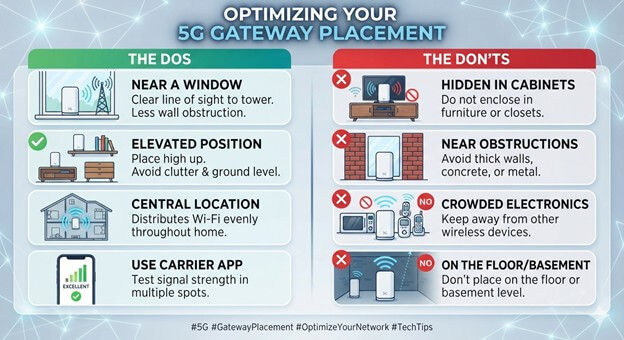
Finding the best position for your 5G home internet gateway requires some testing. Unlike wired connections, a 5G router will extract signals from a cell tower instead of getting it through a direct wire line, which means your router needs to face an outdoor cell tower for best results. You cannot hide the gateway inside a cabinet or behind your console. Signals from the cell tower will get distorted before reaching your gateway.
The best way to find the perfect place for your gateway is to install it near a window with direct outdoor exposure. You can try different windows, or place it near the top floor with the least signal interference for best results.
And since we’re at it, let’s explore some dos and don’ts of the process.
Dos And Don’ts Of 5G Gateway Placement
Here are some of the dos and don’ts of 5G gateway router placement:
Understanding 5G Signal Strength vs. Wi-Fi Coverage
While setting up 5G internet at your home, you must understand the difference between 5G signals and WiFi signals. This will help you choose the perfect spot for your in-home WiFi.
5G signal strength refers to the signal quality of your overall 5G connection in the area, outside your home. It determines how well your connection will perform generally in the area.
WiFi signal, on the other hand, determines in-home connectivity. You might have strong 5G signals in the area but a slow home WiFi. This means your WiFi’s position isn’t optimized and you need to reposition your gateway.
If you have tried multiple positions but are still unable to find the perfect spot for your 5G gateway, you can contact your provider’s customer service and ask for a dedicated guide to help you out.
Troubleshooting Tips for Common 5G Home Internet Issues
Here’s a quick guide to help you troubleshoot common 5G internet issues:
What to do if my gateway cannot connect to the 5G network?
If your gateway is not connecting to the 5G network in your area, you should try rebooting the gateway. Simply plug the gateway off, wait for a few seconds and then switch it back on. This usually helps refresh the connection and connect you online.
If rebooting doesn’t help, try opening the gateway to check if the 5G provider’s SIM card is in good condition. You can open the gateway yourself, or search your provider’s website to see how to open the gateway to readjust the SIM card.
What to do if there are weak 5G signals in my area?
If you get weak 5G signals on your devices, try moving your gateway closer to a window or the ceiling where you can get uninterrupted signals. Repositioning your gateway usually helps restore signal strength quickly.
What to do if my 5G home internet Wi-Fi does not reach certain rooms?
If you experience weak signals in certain rooms in your house, your WiFi router may be insufficient for the area your home covers. In this case, you will need a mesh WiFi system or a signal booster installed to extend WiFi coverage within the house.
Looking to upgrade your home internet connection to a simple plug-and-play setup? Explore the top 5G internet options in your area or talk to our live agents to help pick a suitable plan for your home.